How I Automated Daily WhatsApp Messages to My Cook (No More Headaches!)
The Problem: Every morning at 7:30 AM and evening at 5:30 PM, I had to manually tell my cook what to prepare for lunch and dinner — and we still had to figure out who was eating so she knew how much to make. Miss one message? Wrong meal or no meal. Endless "who's in?" chats. Daily mental load.
The Solution: Two automated pieces in one WhatsApp group: (1) Meal notifications — GitHub Actions + TypeScript + Whapi send the day’s menu from a Google Doc at 7:30 AM and 5:30 PM IST. (2) Poll messages — the same stack sends a WhatsApp poll on schedule: “Who would like to have dinner today?” at 11:30 AM IST and “Who would like to have lunch tomorrow?” at 9:00 PM IST (day before). Everyone ticks Yes/No; the cook sees headcount at a glance. Zero cost. Zero maintenance. One place for the full plan, the automated reminder, and who’s in.
The Daily Headache
If you have a cook who comes to your home, you know the routine:
- 7:30 AM: "Di, aaj lunch mein ye banao..."
- 5:30 PM: "Di, dinner mein ye chahiye..."
- Plus: "Who's having lunch today?" "I'm in for dinner." "Count me out tomorrow."
- Every. Single. Day.
Two problems: what to cook (menu) and who’s eating (headcount). Miss a message? Your cook doesn’t know what to prepare or how much. You end up with the wrong meal, no meal, or too much food. It’s a small task that adds up to real friction.
I thought: "I'm a software engineer. There has to be a better way."
The System: Notifications + Polls
Here’s what we run:
- Meal notifications (automated) — The system sends the day’s menu (sabji, chapati, rice/dal) to the cook group at 7:30 AM and 5:30 PM IST, so she always knows what to make.
- Poll messages (automated) — A separate scheduled job sends a WhatsApp poll to the same group: “Who would like to have dinner today?” at 11:30 AM IST (same day) and “Who would like to have lunch tomorrow?” at 9:00 PM IST (day before). Options: Yes / No. The cook and family see votes and who’s in without typing.
Everything lives in one group: a pinned Google Doc link (full meal plan), the automated “what to cook” messages, and the automated polls for “who’s in.” Menu + attendance in one thread.
Architecture Overview (Meal Notifications)
The automated part looks like this:
Google Doc (Meal Plan)
        ↓
GitHub Actions (Scheduled Runner)
        ↓
TypeScript Script (Parser + Message Builder)
        ↓
Whapi.Cloud API (WhatsApp Gateway)
        ↓
WhatsApp Group (Cook receives meal notification)
A second workflow runs the poll script on schedule and sends the poll to the same group via Whapi’s poll API.
Tech Stack (for both automations)
- GitHub Actions — Free scheduled cron jobs (2,000 minutes/month on free tier)
- TypeScript — Type-safe scripting
- Whapi.Cloud — WhatsApp Business API (Free Sandbox: 150 messages/day)
- Google Docs — Easy meal plan management for non-technical family members
Why This Stack?
- GitHub Actions — Already using GitHub, free tier is generous, reliable cron scheduling
- TypeScript — Better than bash scripts, type safety prevents bugs
- Whapi — Simplest WhatsApp API I found (no Meta Business verification needed for sandbox)
- Google Docs — My parents can update the meal plan without touching code
How the Meal Notification Works
The next sections walk through the meal notification automation. The poll automation (schedule + script) is described later in Poll Messages: Who’s In for Lunch or Dinner?.
1. Meal Plan Google Doc
I maintain a simple Google Doc with a 12-day rotating meal plan:
Day 1
Lunch
Main: Aloo Gobi (potato cauliflower)

Dinner
Main: Rajma Rice (kidney beans)

Day 2
Lunch
Main: Palak Paneer (spinach cottage cheese)

Dinner
Main: Dal Tadka with Roti
...
The script parses this and extracts the "Main" dish for each meal.
2. GitHub Actions Workflow
The workflow runs twice daily, Monday–Saturday:
name: Meal plan WhatsApp

on:
  schedule:
    # 7:30 AM IST = 02:00 UTC (lunch)
    - cron: "0 2 * * 1-6"
    # 5:30 PM IST = 12:00 UTC (dinner)
    - cron: "0 12 * * 1-6"
  workflow_dispatch: # Manual trigger for testing

jobs:
  send:
    runs-on: ubuntu-latest
    steps:
      - uses: actions/checkout@v4
      - uses: actions/setup-node@v4
        with:
          node-version: "20"

      - name: Install and build
        run: npm ci && npm run build

      - name: Send meal plan message
        env:
          WHAPI_API_TOKEN: ${{ secrets.WHAPI_API_TOKEN }}
          WHAPI_GROUP_ID: ${{ secrets.WHAPI_GROUP_ID }}
          MEAL_PLAN_COOK_PHONE: ${{ secrets.MEAL_PLAN_COOK_PHONE }}
          MEAL_PLAN_DOC_ID: ${{ secrets.MEAL_PLAN_DOC_ID }}
        run: node dist/scripts/meal-plan/send-meal-plan-message.js
Poll automation: A second workflow (or extra schedule in the same repo) runs the send-meal-plan-poll.ts script: dinner poll at 11:30 AM IST (“Who would like to have dinner today?”) and lunch poll at 9:00 PM IST (“Who would like to have lunch tomorrow?”). It uses the same WHAPI_API_TOKEN and WHAPI_GROUP_ID; set MEAL_PLAN_POLL_TYPE=lunch or dinner from the schedule so the script knows which poll to send.
Key Features:
- Runs automatically at 7:30 AM and 5:30 PM IST
- Skips Sundays (our cook's day off)
- Manual trigger available for testing
- All secrets stored securely in GitHub
- Same group receives the automated poll messages for "who's in" — one chat for menu + headcount
3. TypeScript Script Logic
The script does four things:
A. Fetch the Google Doc
async function fetchDoc(): Promise<string> {
  const docId = process.env.MEAL_PLAN_DOC_ID;
  const url = `https://docs.google.com/document/d/${docId}/export?format=txt`;
  const res = await fetch(url);
  return res.text();
}
Pro tip: Set your Google Doc to "Anyone with the link can view" so the script can access it without OAuth.
B. Parse Meal Plan by Day
function parseDocText(text: string): DayPlan[] {
  const lines = text
    .split(/\r?\n/)
    .map((l) => l.trim())
    .filter(Boolean);
  const days: DayPlan[] = [];
  let currentDay: number | null = null;
  let mains: string[] = [];

  for (const line of lines) {
    const dayMatch = line.match(/^Day\s+(\d+)$/i);
    if (dayMatch) {
      if (currentDay !== null && mains.length >= 2) {
        days.push({
          dayNum: currentDay,
          lunch: mains[0],
          dinner: mains[1],
        });
      }
      currentDay = parseInt(dayMatch[1], 10);
      mains = [];
      continue;
    }
    if (currentDay !== null && line.startsWith("Main:")) {
      mains.push(line.replace(/^Main:\s*/i, "").trim());
    }
  }
  return days;
}
This parses the plain text export and extracts lunch/dinner dishes for each day.
C. Build the Message
function buildMessage(
  mealType: "lunch" | "dinner",
  sabji: string,
  chapatiCount: number,
  isRiceDay: boolean,
  mentionPhone: string
): string {
  const mealLabel = mealType === "lunch" ? "lunch" : "dinner";
  const riceLine =
    mealType === "lunch"
      ? "Rice aur dal (subah bana lijiye, dono time ke liye)"
      : "Rice aur dal (subah wala use karein)";

  return [
    `@${mentionPhone} di,`,
    `Aaj ${mealLabel} mai niche di gayi chezze bana dijiye`,
    `- Sabji: ${sabji}`,
    `- Chapati: ${chapatiCount}`,
    `- ${riceLine}`,
  ].join("\n");
}
Message format:
@91XXXXXXXXXX di,
Aaj lunch mai niche di gayi chezze bana dijiye
- Sabji: Aloo Gobi
- Chapati: 16
- Rice aur dal (subah bana lijiye, dono time ke liye)
The @mention ensures my cook gets a notification even in a busy group chat.
D. Send via Whapi
async function sendWhapiMessage(body: string): Promise<void> {
  const token = process.env.WHAPI_API_TOKEN;
  const url = "https://gate.whapi.cloud/messages/text";

  const res = await fetch(url, {
    method: "POST",
    headers: {
      "Content-Type": "application/json",
      Authorization: `Bearer ${token}`,
    },
    body: JSON.stringify({
      to: WHAPI_GROUP_ID,
      body,
      mentions: [COOK_PHONE],
    }),
  });

  if (!res.ok) {
    throw new Error(`Whapi send failed: ${res.status}`);
  }
}
Whapi handles the WhatsApp Business API complexity. I just send a POST request.
Setup Guide (Step-by-Step)
Want to build this yourself? Here's how:
Step 1: Clone the Repository
git clone https://github.com/rishabhrathod01/personal_automation.git
cd personal_automation
npm install
npm run build
Repository: github.com/rishabhrathod01/personal_automation
Step 2: Sign Up for Whapi.Cloud
- Go to whapi.cloud
- Sign up (free Sandbox tier)
- Create a channel and link your WhatsApp
- Copy your API Token from the dashboard
Note: The free Sandbox plan includes:
- 150 messages/day
- 5 active conversations/month
- Perfect for this use case!
Step 3: Get Your WhatsApp Group ID
This is tricky — the invite link is NOT the group ID. Run this helper script:
WHAPI_API_TOKEN=your_token npm run meal-plan:get-groups
Output:
Groups:
1. Name: 565A Cook
   ID: 1234567890-1234567890@g.us

2. Name: Family
   ID: 9876543210-9876543210@g.us
Copy the group ID (not the invite link!).
Step 4: Create Your Meal Plan Google Doc
- Create a new Google Doc
- Format it like this:
Day 1
Lunch
Main: Your dish name

Dinner
Main: Your dish name

Day 2
...
- Share → "Anyone with the link can view"
- Copy the Doc ID from URL:
https://docs.google.com/document/d/DOC_ID/edit
Step 5: Set GitHub Secrets
Go to your repo: Settings → Secrets and variables → Actions
Add these 4 secrets:
| Secret Name | Value |
|---|---|
WHAPI_API_TOKEN | Your Whapi token |
WHAPI_GROUP_ID | Group ID from Step 3 (e.g., 123...@g.us) |
MEAL_PLAN_COOK_PHONE | Cook's phone with country code (e.g., 919876543210) |
MEAL_PLAN_DOC_ID | Google Doc ID from Step 4 |
Step 6: Test It!
- Go to Actions tab in GitHub
- Click Meal plan WhatsApp
- Click Run workflow
- Check the "Send Day 1... as test" option
- Click Run workflow
Check your WhatsApp — you should see the message! 🎉
Step 7: Enable the Schedule
Uncomment the schedule lines in .github/workflows/meal-plan-whatsapp.yml:
on:
  schedule:
    - cron: "0 2 * * 1-6" # 7:30 AM IST
    - cron: "0 12 * * 1-6" # 5:30 PM IST
  workflow_dispatch:
Commit and push. Your automation is now live!
Configuration Options
You can customize these in scripts/meal-plan/config.ts:
// Chapati count when rice is not served
const CHAPATI_WITHOUT_RICE = 16;

// Chapati count when rice is served
const CHAPATI_WITH_RICE = 12;

// Weekdays when rice is served (1=Mon, 6=Sat)
const RICE_DAYS: number[] = [3]; // Wednesday
Real-World Impact
Before (notifications + coordination):
- 2 meal messages/day × 6 days/week = 12 manual messages/week
- Plus back-and-forth: “Who’s in for lunch?” “I’m in.” “Not me.”
- Mental overhead: “Did I message the cook? Did we do the headcount?”
- Missed message = wrong meal or wrong quantity
After (automated notifications + automated polls):
- 0 manual meal notifications — automation sends the menu on time
- 0 manual polls — automation sends the dinner poll at 11:30 AM IST and the lunch poll at 9:00 PM IST (day before)
- Set it and forget it for both; family just taps Yes/No when the poll appears
- Family can update the Google Doc; cook sees the plan and the poll results in one chat
Time saved: ~5 minutes/day = 30 hours/year, and no more “who’s eating?” chaos.
More importantly: Zero mental burden. That’s the real win.
Poll Messages: Who’s In for Lunch or Dinner? (Automated)
We use WhatsApp poll messages in the same cook group to see who’s having lunch or dinner. The meal notification answers what to cook; the polls answer how many to expect. Both are automated.
Schedule: A separate GitHub Actions workflow runs the poll script twice daily:
- 11:30 AM IST — “Who would like to have dinner today?” (Yes / No), so the cook knows headcount for the same evening.
- 9:00 PM IST — “Who would like to have lunch tomorrow?” (Yes / No), so she knows headcount for the next day.
The script uses the same WHAPI_API_TOKEN and WHAPI_GROUP_ID as the meal plan message workflow and calls Whapi’s poll API (/messages/poll) with the question and options. The cook and family see the poll in the group, tap Yes/No, and vote counts are visible at a glance. Together: menu from the meal automation, attendance from the automated polls, all in one thread.
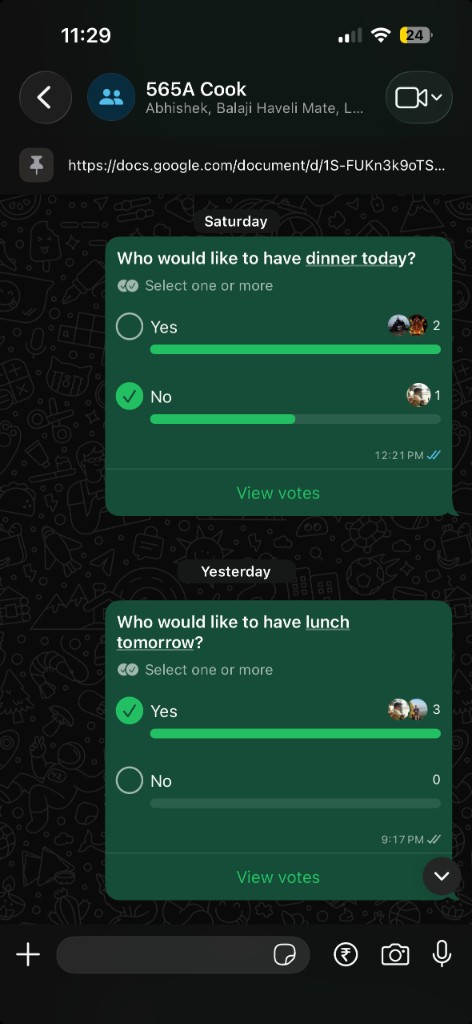
Screenshot: 565A Cook group — pinned meal plan doc and poll messages in use.
Cost Breakdown
Let's talk money:
| Service | Plan | Cost |
|---|---|---|
| GitHub Actions | Free tier (2,000 min/month) | $0 |
| Whapi.Cloud | Sandbox (150 msg/day) | $0 |
| Google Docs | Personal account | $0 |
| WhatsApp polls (via Whapi) | Same API, 2 polls/day × 6 days | $0 |
| Total | $0/month |
For my use case: meal notifications = ~12 Whapi messages/week; polls = ~12 Whapi poll messages/week; plus a few more GitHub Actions minutes for the poll workflow. Everything stays within free limits.
Paid option: If you need more volume, Whapi's Developer Premium plan is $19/month (unlimited messages).
Lessons Learned
1. Whapi's Group ID is NOT the Invite Link
I wasted an hour trying to use chat.whatsapp.com/... before realizing I needed the API group ID. The helper script saves you this headache.
2. Google Docs > JSON Files
Initially, I used a JSON file in the repo for the meal plan. Problem: non-technical family members couldn't update it. Google Docs solved this perfectly.
3. Cron Time Zones are Tricky
GitHub Actions runs in UTC. IST is UTC+5:30. So:
- 7:30 AM IST = 2:00 AM UTC
- 5:30 PM IST = 12:00 PM UTC
Test with workflow_dispatch before enabling the schedule!
4. @Mentions Are Critical
In a group chat, regular messages get lost. The @mention ensures my cook gets a notification even with muted conversations.
5. Error Handling Matters
The script includes proper error handling:
if (!res.ok) {
  const errText = await res.text();
  throw new Error(`Whapi send failed: ${res.status} ${errText}`);
}
When it breaks (and it will), clear error messages in GitHub Actions logs make debugging easy.
Community & Contributions
The full source code is open source:
GitHub: rishabhrathod01/personal_automation
Want to contribute?
- Add support for more messaging platforms (Telegram, Signal)
- Improve meal plan parsing (handle more formats)
- Add internationalization (i18n)
- Build a web dashboard for meal plan management
Fork it and make it your own!
Conclusion
What started as a daily annoyance turned into a simple system: automated notifications for the menu and automated polls for who’s in.
✅ Automated meal notifications — zero manual “what to cook” messages
✅ Automated polls — dinner poll at 11:30 AM IST, lunch poll at 9:00 PM IST (day before), same group
✅ Zero cost — free tier everywhere
✅ Zero maintenance — both automations have been running for months
✅ One place — pinned doc + automated messages + automated polls in a single WhatsApp group
My parents update the meal plan in the Google Doc without touching code. My cook gets the menu on time and the poll at the right time; she just checks the votes. I don’t think about it anymore.
That’s the beauty of it — set up both automations once and forget the rest.
Get Started Today
- Star the repo: github.com/rishabhrathod01/personal_automation
- Follow the setup guide above for the meal notification automation
- Enable the poll workflow and run send-meal-plan-poll.ts on your schedule (dinner poll / lunch poll)
- Customize the meal plan and timings for your household
- Share your automation story!
Have questions? Drop a comment or open an issue on GitHub. I'm happy to help you set this up.
Built something similar? I'd love to hear about your home automation projects. Connect with me on Twitter or LinkedIn.
Related Reading
- System Design Learning Path — 12-Week Intensive Curriculum
- GitHub Actions Documentation
- Whapi.Cloud API Docs
Happy Automating! 🤖✨